


Should I Add Keywords to My Business Name on Google? (Hint: Don’t Make This Costly Mistake)

"Should I add 'Best Plumber in Chicago' to my business name on Google to rank higher?" If you've ever asked yourself this question, you're not alone. Thousands of business owners make this exact mistake every single day, thinking they're getting ahead of their competition by stuffing keywords into their Google Business Profile name.

Here’s the brutal truth: Adding keywords to your business name might give you a temporary ranking boost, but it’s also the fastest way to get your entire Google Business Profile suspended—which means zero visibility, zero calls, and zero customers finding you online.
In 2024 alone, Google removed thousands of business listings for name violations, and with AI-driven enforcement getting stricter every month, the consequences are more severe than ever.
This guide will show you:
- Why keyword stuffing your business name is a ticking time bomb
- Real examples of businesses that got suspended (and lost everything)
- What Google’s 2025 guidelines actually say about business names
- The right way to optimize for keywords without risking suspension
- How to protect your profile from competitors who might report violations
The Temptation: Why Business Owners Stuff Keywords in Their Names
Let’s be honest—when you see your competitor ranking #1 in Google Maps with a business name like “Best Emergency Plumber Chicago 24/7,” it’s tempting to think you need to do the same thing.
And here’s the kicker: keyword stuffing in business names does work for ranking. Studies show that businesses with keywords in their names often outrank competitors in local search results.
Real Examples of Keyword-Stuffed Names That Worked (Until They Didn’t)
- “Coffee Shop Near Me” – A coffee shop in Hilton Head literally named their business this to capture tourist searches
- “The Great Asian Restaurant” – Includes “Asian Restaurant” to rank for “Asian Restaurant Westerville”
- “Best Emergency Plumber Chicago 24/7” – Targets multiple high-value keywords
These businesses saw initial success. Their phones were ringing, customers were finding them, and they were dominating local search results.
Then Google’s algorithm updates hit.
The Reality Check: What Actually Happens When You Get Caught
Case Study: The Law Firm That Lost Everything

One documented case involved a law firm that added location and service keywords to their business name. A competitor reported them through Google’s business redressal form, and within 48 hours:
- Their Google Business Profile was suspended
- 5 years of 5-star reviews disappeared
- Their local search rankings vanished
- Phone calls dropped to zero
- It took 3 months to get reinstated (with all reviews permanently lost)
The financial impact? Over $50,000 in lost revenue during the suspension period.
The Suspension Avalanche Effect
When Google suspends your business profile for name violations, here’s what happens:
- Immediate Invisibility: Your business disappears from Google Maps and local search results
- Lost Reviews: Years of customer reviews become inaccessible
- Ranking Reset: Even after reinstatement, you often start from scratch
- Customer Confusion: Existing customers can’t find your listing
- Competitor Advantage: Rivals capture your search traffic
According to Birdeye’s 2024 State of Google Business Profile report, a verified profile receives about 200 interactions per month. Losing this means losing 200+ potential customers monthly.
Google’s 2025 Guidelines: What’s Actually Allowed

Google’s official guidelines are crystal clear about business names, but many business owners have never actually read them. Here’s what Google explicitly states:
What Your Business Name MUST Be:
- Your real business name as it appears on your storefront signage
- Consistent with your legal business registration
- Identical across all locations (for multi-location businesses)
- Free of promotional language or keyword stuffing
What Google Explicitly Prohibits:
❌ Keyword Stuffing Examples:
- “Joe’s Plumbing – Best Plumbers in Chicago”
- “Smith Law Firm | Personal Injury Attorneys”
- “Quick Fix Repair + Emergency HVAC Services”
❌ Location Stuffing:
- “Downtown Pizza” (if not officially part of the name)
- “Chicago Auto Repair” (unless legally registered as such)
❌ Service Descriptions:
- “24/7 Locksmith Emergency Services”
- “Affordable Dentistry and Cosmetic Procedures”
❌ Special Characters and Formatting:
- “Sandy’s Café ☕” (emojis not allowed)
- “$$$$ BUDGET AUTO” (excessive capitalization)
- “Best★★★★★Plumber” (promotional symbols)
What IS Allowed:
✅ Legal Business Names: If your business is legally registered as “Chicago Emergency Plumbing LLC,” then that’s what should appear on your Google Business Profile.
✅ Descriptive Names: Some businesses legitimately have descriptive names like “The Home Depot” or “General Motors”—these are fine because they’re the actual registered business names.
✅ DBA Names: If you have a “Doing Business As” (DBA) registration that includes descriptive terms, you can use that name.
The Enforcement Reality: How Google Catches Violators
1. Automated AI Detection
Google’s AI systems automatically scan business names for violations. The algorithms look for patterns like:
- Common keyword combinations
- Location + service descriptors
- Promotional language
- Inconsistencies with website/citations
2. Competitor Reports
Your competitors can (and do) report violations through:
- Google’s business redressal form
- “Suggest an edit” feature
- Direct reporting to Google
Shocking fact: According to Local Search Forum discussions, competitor reporting is one of the most common causes of suspensions.
3. User Suggestions
Even customers can accidentally trigger suspensions by suggesting “corrections” to your business name if they think it looks spammy.
4. Manual Reviews
Google sometimes conducts manual reviews of profiles, especially in competitive industries like legal services, home services, and healthcare.
Industry-Specific Risks: Which Businesses Get Targeted Most
Certain industries face heightened scrutiny due to historical abuse:
High-Risk Categories:
- Locksmiths (infamous for spam tactics)
- HVAC contractors (heavily competitive)
- Personal injury lawyers (high-value keywords)
- Emergency services (plumbers, electricians)
- Medical practices (strict healthcare regulations)
The “Vicinity Algorithm Update” Impact
In 2021, Google rolled out the Vicinity Algorithm Update specifically to combat keyword stuffing in business names. Businesses that had been gaming the system with stuffed names saw significant ranking drops, while those with clean, legitimate names benefited.
The Right Way to Optimize for Keywords (Without Getting Suspended)
Just because you can’t stuff keywords in your business name doesn’t mean you’re powerless. Here are legitimate ways to optimize for target keywords:
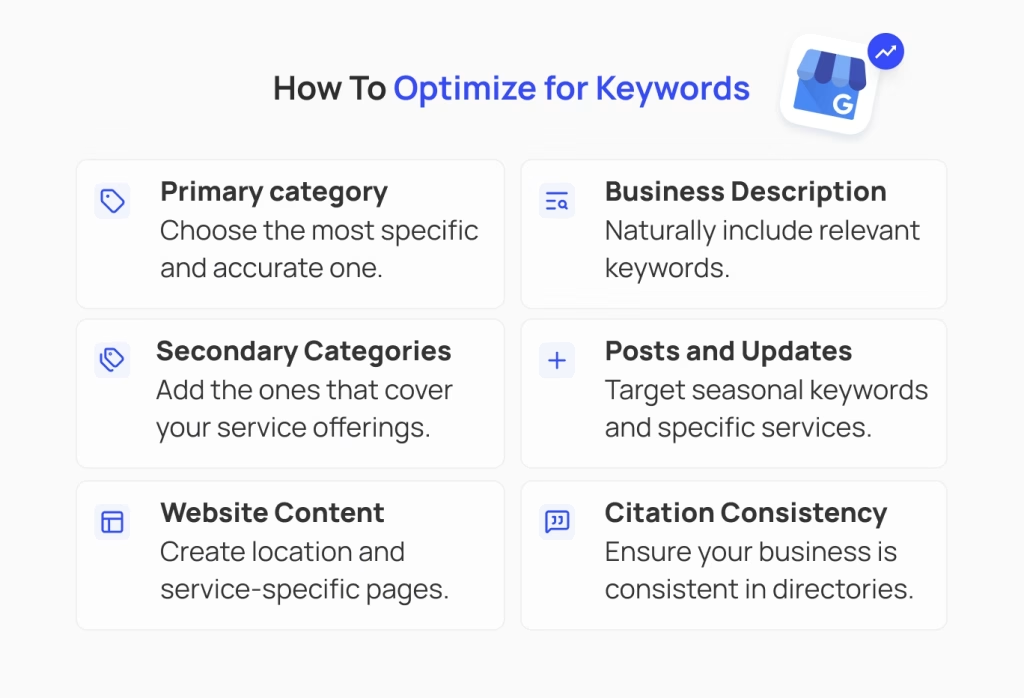
1. Perfect Your Primary Category
Your primary Google Business Profile category is the #1 ranking factor according to local SEO experts. Choose the most specific, accurate category that matches your business.
Example: Instead of changing your name to “Emergency Plumber Chicago,” select “Emergency Plumbing Service” as your primary category.
2. Optimize Your Business Description
Use your business description to naturally include relevant keywords and service areas:
“Serving Chicago and surrounding areas with 24/7 emergency plumbing services. Specializing in leak repairs, drain cleaning, and water heater installation.”
3. Leverage Secondary Categories
Add relevant secondary categories that cover your service offerings without cluttering your business name.
4. Use Posts and Updates
Regular Google Business Profile posts allow you to target seasonal keywords and specific services.
5. Optimize Your Website Content
Your website content influences your local rankings. Create location and service-specific pages with proper keyword optimization.
6. Build Citation Consistency
Ensure your business name, address, and phone number (NAP) are consistent across all online directories.
What to Do If You’re Already Using Keywords in Your Name
If you’re currently using a keyword-stuffed business name, here’s your action plan:
Step 1: Assess Your Risk
- How obvious is the keyword stuffing?
- Are competitors likely to report you?
- Do you have solid reviews and engagement?
Step 2: Plan Your Name Change
- Research your actual legal business name
- Consider registering a DBA if needed
- Plan the transition timing
Step 3: Make the Change Strategically
- Update your legal name first (if needed)
- Change signage and official documents
- Update your Google Business Profile
- Monitor for suspension triggers
Step 4: Strengthen Other Ranking Factors
- Focus on getting more reviews
- Increase posting frequency
- Optimize categories and description
- Build local citations
Protecting Your Profile: Advanced Monitoring Strategies
Even if you follow all the rules, your profile can still face threats from:
- Competitor reports
- User suggestions
- Algorithm changes
- Google policy updates
Professional Protection Solutions
Our advanced Google Business Profile monitoring system provides comprehensive protection against name-related violations and other threats:
- Real-time violation detection that alerts you before suspensions occur
- Competitor activity monitoring to identify potential threats
- Automated compliance checking against Google’s latest guidelines
- Instant alerts when someone suggests changes to your business name
- Expert intervention when manual resolution is needed
Unlike basic notification systems that only tell you after problems occur, our proactive monitoring prevents violations from triggering suspensions in the first place.
Red Flags: Signs Your Profile Might Be at Risk
Watch out for these warning signs that could lead to suspension:
Immediate Risks:
- Business name includes obvious service keywords
- Location terms added to official name
- Special characters or excessive capitalization
- Promotional language in the name
Behavioral Risks:
- Frequent changes to business name
- Inconsistent NAP across platforms
- Recent category changes
- Competitor complaints
Environmental Risks:
- Operating in a high-scrutiny industry
- Strong local competition
- Previous violations or warnings
- Inconsistent online presence
The Cost of Doing Nothing: Real Financial Impact
Let’s put this in perspective with real numbers:
Average local business statistics:
- 200 customer interactions per month from Google Business Profile
- 70% of local searches result in store visits within 24 hours
- Average customer value: $150-300 depending on industry
Cost of 3-month suspension:
- Lost interactions: 600 potential customers
- Lost revenue: $90,000-180,000 for average business
- Recovery time: 6-12 months to rebuild rankings
- Reputation damage: Immeasurable
Compare this to legitimate optimization costs:
- Professional name optimization: $500-1,500
- Ongoing monitoring: $99-299/month
- Legal DBA registration: $50-300
The math is clear: prevention costs pennies compared to suspension recovery.
What Google’s AI Evolution Means for 2025 and Beyond
Google’s enforcement is getting smarter and more aggressive:
AI-Powered Detection
- Machine learning identifies subtle violations
- Pattern recognition catches previously missed infractions
- Automated enforcement reduces manual review delays
Stricter Penalties
- Faster suspensions for violations
- Longer reinstatement processes
- More permanent bans for repeat offenders
Community Reporting Integration
- User reports carry more weight
- Competitor reporting is easier than ever
- Crowd-sourced violation detection
Bottom line: The window for getting away with keyword stuffing is closing fast.
Take Action Before It’s Too Late
The question isn’t whether Google will crack down on keyword-stuffed business names—it’s when your number will come up.
Your immediate action plan:
- Today: Audit your current business name for violations
- This week: Research your legal options (DBA, name change)
- This month: Implement legitimate optimization strategies
- Ongoing: Monitor for threats and policy changes
Don’t wait until you’re staring at a suspension notice to take your Google Business Profile seriously.
Protect Your Business Profile Before Competitors Strike
Why risk everything for a short-term ranking boost when you can dominate legitimately?
Your Google Business Profile is too valuable to gamble with keyword stuffing. But that doesn’t mean you should leave it unprotected from competitors, policy changes, and algorithm updates.
Our proven Google Business Profile monitoring and protection service has helped thousands of businesses stay compliant while maximizing their local search visibility.
What you get with our protection service: ✅ Compliance monitoring – instant alerts for potential violations
✅ Competitor threat detection – know when rivals are targeting you
✅ Policy update notifications – stay ahead of Google’s changes
✅ Name optimization guidance – legitimate strategies that work
✅ Automated protection – 24/7 monitoring that never sleeps
✅ Expert support – real humans when you need help
✅ Violation prevention – stop problems before they cause suspensions
Special Offer for Smart Business Owners: Get your first month of complete Google Business Profile protection absolutely free. No setup fees, no long-term contracts, no risk of suspension.

Protect Your Google Business Profile Before It’s Too Late
Keyword stuffing might give you a quick ranking boost, but it’s the fastest way to get suspended, and lose your reviews, calls, and visibility. With Olly Olly, you’ll safeguard your profile, stay compliant with Google’s rules, and build long-term local SEO success without risky shortcuts.
Book For Free Consultation NowDon’t let keyword stuffing destroy years of hard work. Join thousands of smart business owners who protect their profiles while competitors get suspended for risky tactics.
Questions about your business name compliance? Our Google Business Profile experts are standing by to audit your profile and ensure you’re protected from suspension risks. The consultation is free, and you’ll have complete peace of mind within 24 hours.

Elisabeth Spencer
CEO & Co-Founder
Elisabeth Spencer leads Olly Olly with a clear mission: to make growth attainable for everyday business owners. She is recognized for pairing sharp business instincts with a down-to-earth leadership style that inspires both her team and the clients they serve. Elisabeth believes the best companies are built with equal parts ambition and humanity: values that continue to shape Olly Olly’s culture and its impact on entrepreneurs nationwide.
This might interest you:
Marketing Strategy
11 min read
Is Your Business Working You to Death? 5 Marketing Tasks You Can Automate Today
Spending 10-15 hours a week on manual marketing? Here are 5 critical tasks you can automate right now - and finally get back to running...

Blog
5 min read
Own Your Local Business Visibility: Why Citation Ownership Beats Rental Models
Stop renting your local visibility. Learn why owning permanent citations with Olly Olly beats Yext’s "disappearing" rental model to build a lasting, secure digital foundation.
Marketing Strategy
7 min read
ChatGPT Is Adding Ads. Here’s What Small Businesses Should Actually Do About It
OpenAI is testing ads in ChatGPT, but should local businesses bite? Skip the hype and learn why becoming the organic "AI answer" beats paying for...