


Someone Changed My Google Business Profile Without Permission—Here’s How to Stop It and Get Your Business Back

Have you ever woken up to find your business hours are wrong on Google? Your phone number changed? Your website URL pointing somewhere else? Or worse—your business marked as "permanently closed"?

You’re not alone. Thousands of business owners discover unauthorized changes to their Google Business Profile (GBP) every single day. Many don’t realize it’s happening until customers start complaining or their phone stops ringing.
The truth? Anyone can suggest edits to your Google Business Profile, including your competitors. And Google often accepts those changes automatically, sometimes without notifying you first.
If this is happening to your business, don’t panic. This guide will show you how to:
- Stop unauthorized changes immediately
- Regain control of a profile you’ve lost access to
- Protect your business from future attacks
- Spot signs of competitor sabotage
The Real-World Impact: Why This Matters More Than You Think
Research from Sterling Sky found that even small changes to your profile can cause an 11% drop in branded searches and big drops in clicks.
But this isn’t just about numbers.
Customer trust: One business owner discovered their competitor had changed their phone number so calls went straight to the rival company.
Financial loss: Another business’s opening date was changed to show “Opens Next Year,” explaining why their phones were silent for months.
Reputation damage: In one case, a website link was changed to inappropriate content and stayed live for more than 24 hours.
How Unauthorized Changes Happen (The 4 Main Culprits)
Understanding how your Google Business Profile gets changed without your permission is the first step to stopping it. According to Google and local SEO experts, unauthorized edits typically come from four main sources:
1. Public User Suggestions (The Biggest Threat)
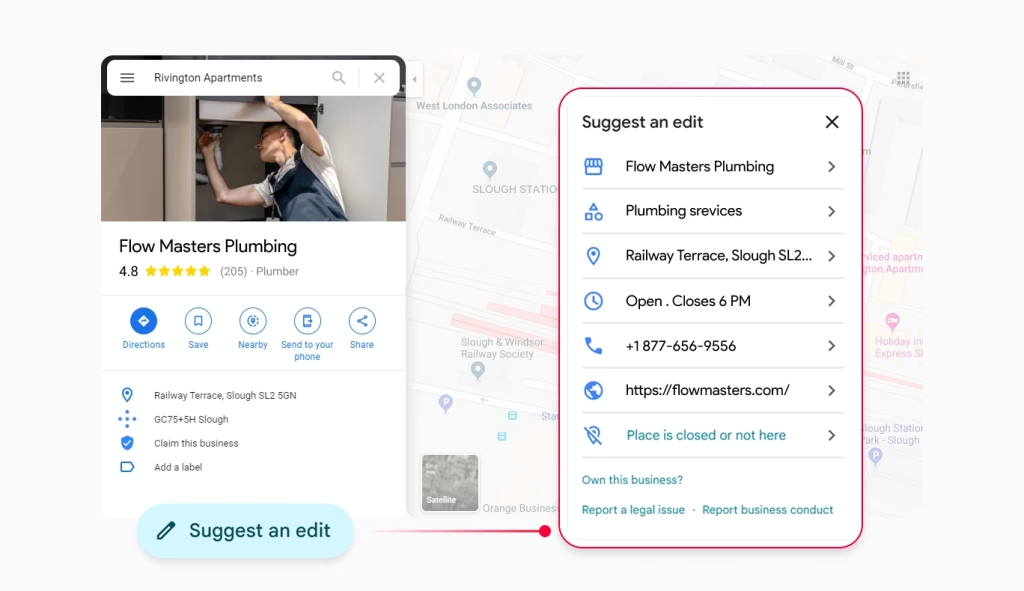
Anyone can click “Suggest an edit” on your Google Business Profile and propose changes to your business name, hours, phone number, website, address, and even suggest your business is permanently closed.
The Problem: Google often automatically accepts these suggestions, especially if they come from users with high “Local Guide” status or if multiple people suggest the same change.
Real Example: One business owner reported that a competitor maliciously changed their physical address, causing them to “completely drop out of the map pack” and devastating their local rankings.
2. Competitors and Malicious Actors
Yes, competitors can and do edit your listing on Google Business Profile. Joy Hawkins of Sterling Sky documented numerous cases where rivals have made malicious changes, including:
- Changing phone numbers to redirect to competitors
- Moving map pins to wrong locations
- Marking businesses as permanently closed
- Adding incorrect hours to hurt customer experience
3. Third-Party Apps and Tools
If you’ve connected any listing management tools, apps, or software to your Google Business Profile, these can make unwanted changes or even delete your profile entirely.
4. Google’s Automated Systems
Google automatically pulls information from your website, other directories, and even AI analysis of photos to update your profile. Sometimes this information is outdated or incorrect.
Emergency Response: What to Do Right Now
If you’ve discovered unauthorized changes to your Google Business Profile, follow these steps immediately:
Step 1: Document Everything
Take screenshots of the incorrect information before you change anything. This creates evidence of the unauthorized changes that you may need later.
Step 2: Check Your Dashboard
Log into your Google Business Profile dashboard and look for orange-highlighted changes. These indicate suggested edits that you can accept or reject.
Step 3: Reverse the Changes
Make the corrections immediately. In most cases, you can simply change the information back to what it should be.
Step 4: Verify You Still Have Access
Ensure you can still make changes and that your email notifications are working. If you can’t access your profile at all, skip to the “Regaining Lost Access” section below.
How to Regain Access to a Google Business Profile You No Longer Own
Losing access to your Google Business Profile is one of the most stressful situations a business owner can face. This commonly happens when an employee who managed the profile leaves the company, when businesses change ownership, or when Google suspends the profile due to policy violations.
Method 1: Request Ownership Transfer
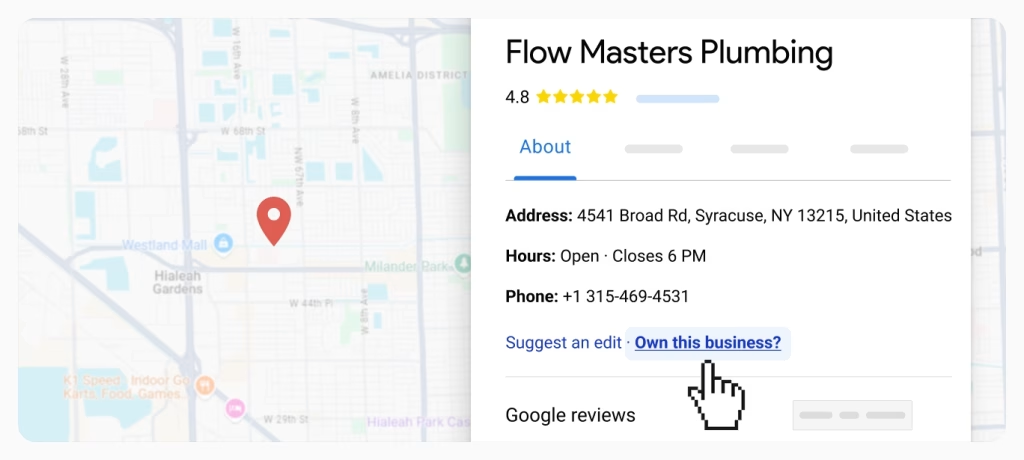
If someone else currently manages your business profile:
- Find Your Business: Go to business.google.com/add and search for your business
- Request Access: Click “Request Access” and fill out the form explaining your relationship to the business
- Wait for Response: The current owner has 3 days to respond. They can approve, deny, or ignore your request
- Claim if No Response: If there’s no response after 3 days, you’ll have the option to claim the profile yourself through verification
Method 2: Account Recovery
If you’ve forgotten login credentials:
- Use Google Account Recovery: Visit the Google Account Recovery page and follow instructions to verify your identity through security questions, recovery email, or phone number
- Contact Former Employees: If an ex-employee managed the profile, try to contact them for assistance or recover their email account if it was company-owned
Method 3: Appeal Suspended Profiles
If your profile was suspended, review Google’s policies to identify violations, address any issues, then submit an appeal through the Google Business Profile Help Center.
Method 4: Contact Google Support
When all else fails, contact Google Support directly through the Google Business Profile Help Center. Be prepared to provide detailed business information and documentation proving ownership.
Can Competitors Really Edit Your Business Listing? (Yes, and Here’s Proof)
The answer is absolutely yes, and it’s more common than you think.
Documented Cases from Industry Experts
According to Joy Hawkins from Sterling Sky, one of the leading authorities on local SEO: “Competitors Can Edit Your Listing on Google Business Profile” and she’s documented numerous cases of malicious editing.
In Local Search Forum discussions, business owners regularly report competitor sabotage, including cases where competitors repeatedly made edits causing profile suspensions.
How Competitors Exploit the System
The likelihood of edits being accepted depends on several factors that competitors can exploit:
- Local Guide Status: Users with higher Local Guide levels have more influence
- Multiple Suggestions: When several people suggest the same change
- Inactive Profiles: Businesses that don’t regularly update their profiles are more vulnerable
- Inconsistent Information: Profiles with conflicting information across the web are easier targets
Real Examples from the Field
One Local Search Forum member reported: “It happened to one of our clients, someone – clearly maliciously, changed their physical address and Google immediately accepted it. They completely dropped out of the map pack. This was devastating.”
Another business owner discovered their competitor had added a wheelchair accessibility attribute to their service-area business, which caused Google to take down their listing since service-area businesses don’t serve customers at their physical location.
Check if Your Google Profile’s Been Changed
Run your free Business Audit Report to see if competitors or Google edits have changed your business info online.
Run My Free AuditAdvanced Protection Strategies: How to Bulletproof Your Profile
1. Enable All Notification Settings
Check your Google Business Profile settings and ensure email notifications for changes are enabled. This ensures you’re notified whenever someone suggests an edit.
Pro Tip: Even with notifications enabled, emails can be missed or go to spam folders, so this alone isn’t enough protection.
2. Regular Manual Monitoring
Manually review your Google Business Profile at least weekly, checking for pending updates in the “Edit profile” section. Any unauthorized updates will be highlighted in orange.
3. Complete Your Profile Thoroughly
The more information you provide and the more frequently you update your profile, the less likely Google is to accept unauthorized changes from external sources.
4. Maintain Information Consistency
Ensure your business information is consistent across your website, social profiles, and other directories. Inconsistent information makes your profile more vulnerable to unwanted edits.
5. Use Professional Monitoring Tools
The most effective way to protect your Google Business Profile is through automated monitoring that watches for changes 24/7 and can instantly block unauthorized edits before they go live.
Our advanced GBP monitoring system provides:
- Real-time alerts for any suggested changes or edits
- Automatic rejection of unauthorized modifications
- Instant notifications when competitors attempt malicious edits
- Complete change history tracking with detailed logs
- Multi-location management for businesses with several profiles
Unlike basic notification systems that only tell you after changes happen, our proactive monitoring prevents unauthorized changes from ever going live on your profile.
6. Remove Unnecessary Access
Regularly audit which third-party apps and people have access to your profile. Remove any tools you no longer use and any employees who have left the company.
To check third-party access:
- Go to your Google Account settings
- Click “Third-party apps with account access”
- Remove any unfamiliar or unnecessary apps
What to Do If You’re Under Attack
If you suspect competitors are repeatedly targeting your profile:
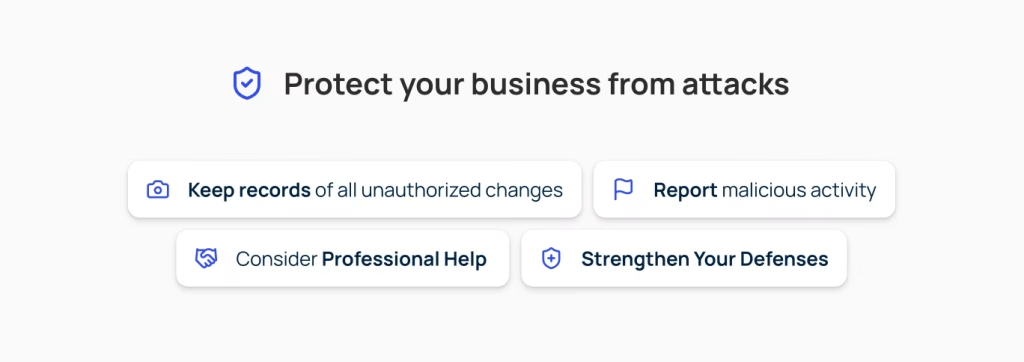
1. Document Everything
Keep detailed records of all unauthorized changes, including:
- Screenshots of incorrect information
- Dates and times of changes
- Email notifications from Google
- Any patterns in the timing of edits
2. Report Malicious Activity
While Google doesn’t have a specific mechanism for reporting malicious edits, you can escalate issues through Google Business Profile Support, especially if you have evidence of repeated attacks.
3. Consider Professional Help
Companies like Steady Demand specialize in protecting businesses from malicious Google Business Profile edits and have experience dealing with competitor attacks.
4. Strengthen Your Defenses
- Increase your monitoring frequency to daily
- Set up multiple notification methods
- Build stronger positive signals (more reviews, regular posts, frequent updates)
- Consider using paid tools that can automatically override edits through API connections
Prevention: Building Long-Term Protection
The Three-Layer Defense Strategy
Layer 1: Technical Protection
- Enable all notifications
- Use monitoring tools
- Regular manual checks
- API-based management tools
Layer 2: Information Management
- Complete, accurate profiles
- Consistent information across all platforms
- Regular updates and fresh content
- Strong review profile
Layer 3: Community Building
- Encourage legitimate customer engagement
- Build relationships with Local Guides
- Create positive online presence
- The more active and popular your listing becomes, the harder it is for malicious edits to be accepted
When to Seek Professional Help
Consider professional GBP monitoring and protection if:
- You’ve lost access and can’t recover it yourself
- You’re experiencing repeated malicious attacks
- Your business depends heavily on local search visibility
- You manage multiple locations
- You don’t have time to monitor profiles consistently
- You want bulletproof protection that works 24/7
Why business owners choose our monitoring service:
- Immediate Protection: Setup takes minutes, protection starts instantly
- Zero Maintenance: Completely automated – you never have to think about it
- Expert Support: Real humans available when you need help
- Proven Results: Successfully protecting thousands of business profiles
- Affordable: Costs less than losing even one customer to incorrect information
The Bottom Line: Protect Your Business Before It’s Too Late
Losing access to your Google Business Profile or having competitors sabotage your listing is “an urgent matter” that can devastate your business overnight. Every day your profile shows incorrect information is a day you’re losing customers to competitors.
The cost of doing nothing:
- Lost customers who can’t reach you
- Damaged reputation from wrong information
- Competitors stealing your phone calls
- Hours of your time fixing problems that could be prevented
Your immediate action plan:
- Right Now: Check your Google Business Profile for any unauthorized changes
- Today: Enable all notification settings and document your current information
- This Week: Set up automated protection to prevent future attacks
- This Month: Complete your profile optimization and audit all third-party access
Remember: While basic manual monitoring helps, only automated professional protection can prevent unauthorized changes before they damage your business.
Don’t Wait Until It’s Too Late – Protect Your Business Profile Now
Why wait for competitors to attack when you can prevent it entirely?
Our proven GBP monitoring and protection service has successfully defended thousands of business profiles from unauthorized changes, malicious edits, and competitor sabotage.
What you get with our protection service:
✅ Instant setup – protection starts immediately
✅ 24/7 automated monitoring – never miss a threat
✅ Automatic blocking of unauthorized changes
✅ Real-time alerts when threats are detected
✅ Expert support when you need help
✅ Multi-location management for growing businesses
✅ Complete audit trails for peace of mind

Stop Unauthorized Changes to Your Google Business Profile
Competitors and strangers can edit your Google Business Profile without your knowledge. Protect your listing, prevent sabotage, and keep control of your business with 24/7 monitoring and expert support.
Protect My Profile TodayJoin thousands of smart business owners who never worry about their Google Business Profile because they know it’s protected 24/7. Your competitors won’t know what hit them.
Still have questions? Our GBP protection experts are standing by to help you secure your business profile and stop unauthorized changes permanently. The consultation is free, and you’ll have complete protection within 24 hours.

Elisabeth Spencer
CEO & Co-Founder
Elisabeth Spencer leads Olly Olly with a clear mission: to make growth attainable for everyday business owners. She is recognized for pairing sharp business instincts with a down-to-earth leadership style that inspires both her team and the clients they serve. Elisabeth believes the best companies are built with equal parts ambition and humanity: values that continue to shape Olly Olly’s culture and its impact on entrepreneurs nationwide.
This might interest you:
Google Business Profile
15 min read
Google Business Profile Optimization: The 33% of Local Visibility Most Businesses (and Their SEO Companies) Ignore
Is your SEO company ignoring the 33% of local visibility that actually drives calls? Learn why your Google Business Profile is the "missing link" to...
Marketing Strategy
11 min read
Is Your Business Working You to Death? 5 Marketing Tasks You Can Automate Today
Spending 10-15 hours a week on manual marketing? Here are 5 critical tasks you can automate right now - and finally get back to running...

Blog
5 min read
Own Your Local Business Visibility: Why Citation Ownership Beats Rental Models
Stop renting your local visibility. Learn why owning permanent citations with Olly Olly beats Yext’s "disappearing" rental model to build a lasting, secure digital foundation.